

Product Updates
Release notes for the SLS Platform. This page is updated with new features, improvements, and bug fixes.
New Features
- Updated the SCA Scanner to support .NET dependencies from
packages.lock.jsonfor the NuGet package manager. To enable the lock file feature, add the following property to your project file:
- The SCA scanner now excludes dev dependencies from NPM manifest files by default.
New Features
- Added New Product Team based KPIs for the Average Age of Open Risks, Average Time to Close and the Count of Open Critical Risks.
- New Team Member KPIs which displays metrics for count of assigned tickets, closed tickets, average time to close, and average age of open tickets. The page also shows the open Assigned Risk items to the team member.
- Revised the Product Team Member view to show summary information for team members.
- Added the ability to add Container Images from the Asset List once a container registry has been configured.
- Added the Source File Location for SCA findings in the Risk Finding Details side panel. This will identify the manifest or file that the dependency was found in.
- Added code snippets for SAST findings in the Risk Finding Details side panel. This will identify the line of code that the finding was found in.
- DAST Findings ingestion enhancements, split the location and line number into separate fields and added the Web Request and Response details to the Risk Finding Details side panel.
Bug Fixes
- Fixed an issue with the Global Account Configuration for AI Remediation.
Enhancements
- Updated the Account Settings & User Management pages.
- Can now provide user-defined values for Service Level Agreement (SLA) for Vulnerabilities based on severity.
- Added the ability to disable AI settings (AI Remediation)
New Features
Added support for Dynamic Application Security Testing (DAST) scans in the SLS Platform. See DAST Scan for more information on integrating a DAST scan into your CI/CD pipeline.There is a new asset type for Domain (URL) assets which are the targets for DAST scans. To add a Domain asset, click on Assets in the side menu, then the New Asset button and select Domain.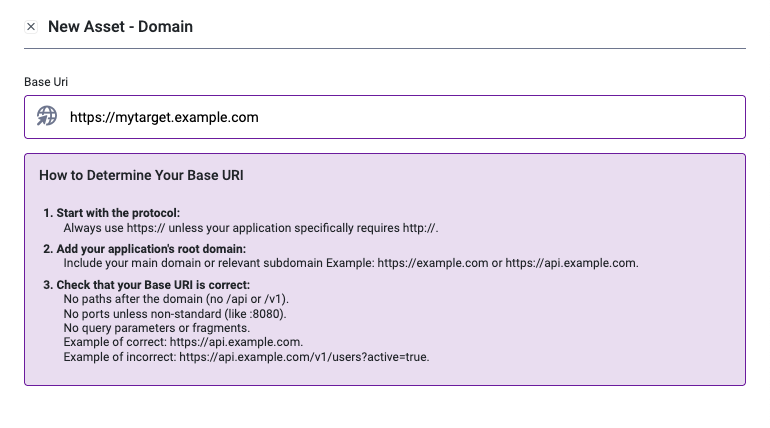
Enhancements
- Added a Risk Score Tooltip in the Risk Details panel.
Bug Fixes
- Removed Archived Products from being displayed in the Product List / Dashboards.